
Alight Motion Mod APK is the Android motion-graphics editor with its three paywalls patched out: the export watermark, the 4K/60 fps cap and the padlocks on premium effects and Elements Store assets. No subscription, no account.
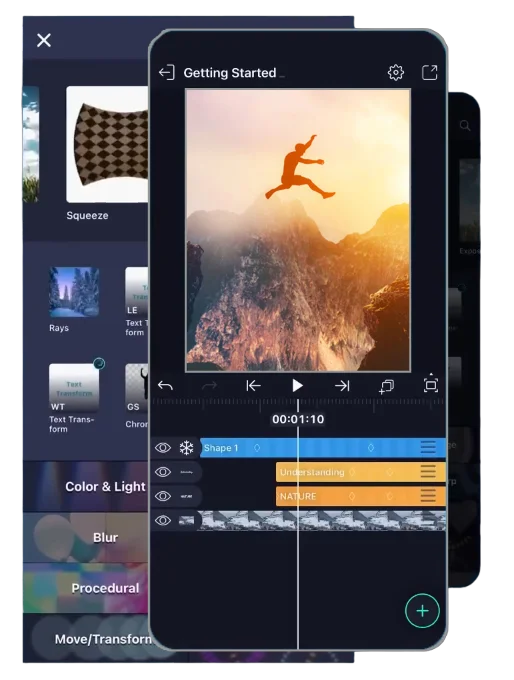
UPDATE: The file on this page is the mod of version 5.0.279, a maintenance release with stability fixes and more reliable export on Android 15 and 16. It adds no new tools. After installing, Settings → About should show 5.0.279. If it shows a different number, you installed a different file.
| App Name | Alight Motion MOD APK |
|---|---|
| Version | 5.0.279 |
| File Size | 112 MB |
| Last Updated | 17.07.2026 |
| Required OS | Android 7.0+ |
| Package Name | com.alightcreative.motion |
| Mod Features | Pro Unlocked / No Watermark / No Ads |
What the Mod Changes
The mod is the official APK with three restrictions patched out before installation: the export watermark, the resolution and frame rate cap, and the padlocks on premium tools and Elements Store assets. The editor itself is untouched — same interface, same project format, same version numbering.
| Free (Play Store) | Premium | Mod APK | |
|---|---|---|---|
| Export watermark | On every export | None | None |
| Max export | Capped below 4K/60fps | 4K, 60fps | 4K, 60fps |
| Effects library | Premium ones show a padlock | Full library, 160+ | Full library |
| Graph editor | Basic keyframes only | Velocity and Bézier easing | Velocity and Bézier easing |
| Store packs | Locked | Included | Unlocked |
| Ads | Yes | None | None |
| Price | Free | Monthly, yearly and lifetime | Free |
| Sign-in, cloud sync | Works | Works | Local backups only |
Unlocked Tools
- Export — no watermark on MP4, GIF, PNG sequence or stills; canvases up to 4096 × 4096 at 60 fps with velocity-based motion blur.
- Velocity graph — custom easing curves on any keyframe of any parameter. Free builds allow only linear keyframes.
- Effects — all 160+ building blocks: chroma key, glitch, distortion, blur, light leaks, colour wheels and curves, stackable on a single layer.
- Compositing — unlimited video, graphic and audio layers, blend modes, masks, groups, parent-child linking for rigging.
- Cameras — pan and zoom with focus blur and fog, keyframed like any other parameter.
- Vector tools — vector shapes drawn and edited on-device, plus animated brushes.
- Elements Store — premium fonts, overlays, sound packs and preset bundles.
- Audio — waveform visualisations generated from and synced to your track.
Limitations
- Cloud sync doesn’t work — the patched signature fails Alight Creative’s server check, so projects stay in local storage. Export the .xml before reinstalling anything.
- No automatic updates. Each new build is a manual APK reinstall, released weeks after the official version and only while the mod author keeps building. Installing over the official app fails on signature mismatch, so it must be uninstalled first — which deletes any projects still in app storage.
- Play Protect flags the file as a repacked binary from an unknown signer. Signing into a real Alight Motion account inside a modded build risks that account.
- Account-based features of 5.0 — Creator Rewards, cloud templates, project links — need a signed-in official build and don’t work here.
- The mod bypasses Alight Creative’s paid plan, which breaks the app’s terms of service. There is no official support, and the developers earn nothing from mod users.
Allow APK Installs on Android
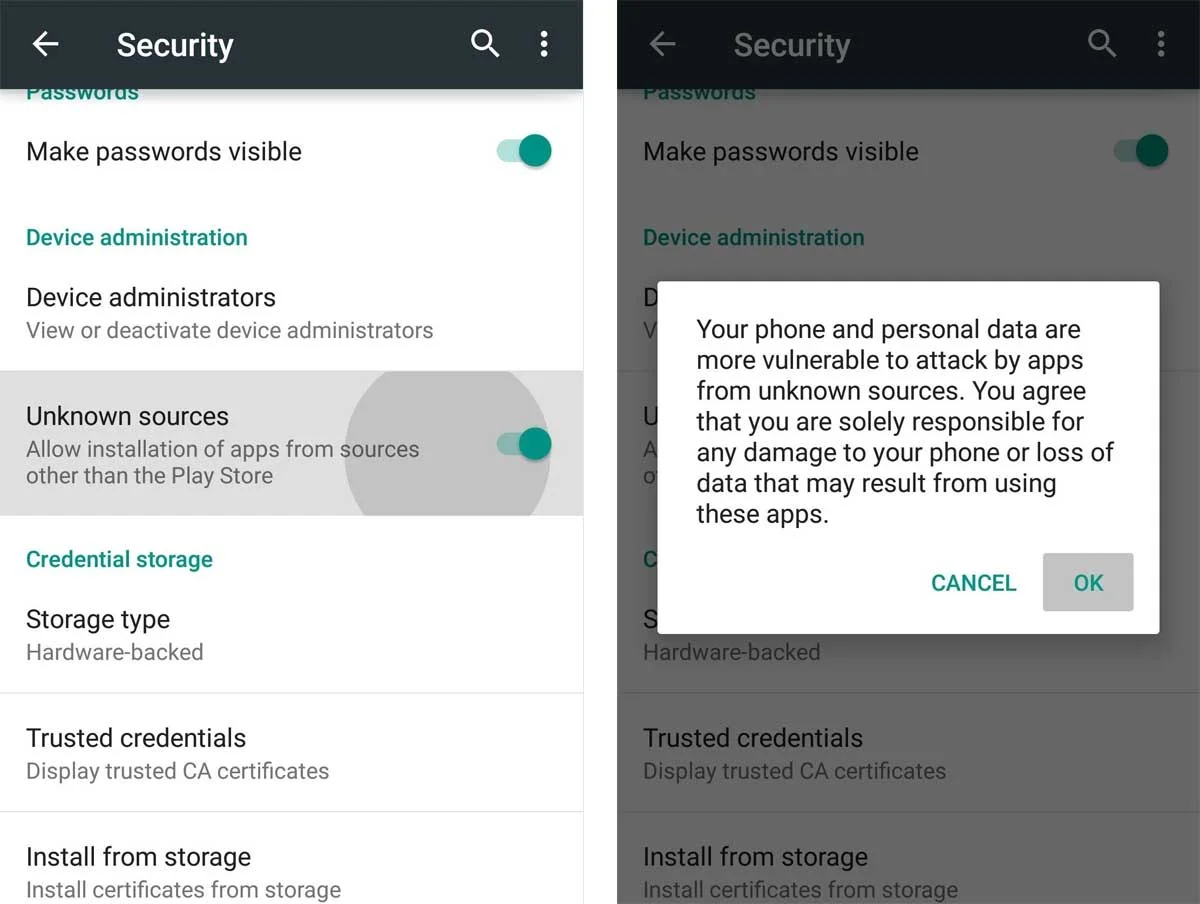
Android blocks apps from outside the Play Store until you allow the app that opens the file — usually Chrome or your file manager. On Android 8 and newer this is a per-app permission:
- Tap the downloaded APK. Android shows “For your security, your phone is not allowed to install unknown apps from this source”.
- Tap Settings in that dialog and turn on Allow from this source.
- Go back — the install screen opens.
If the dialog doesn’t appear, the same switch is in Settings → Apps → Special app access → Install unknown apps (on Samsung: Apps → ⋮ → Special access). On Android 7 it is a single toggle: Settings → Security → Unknown sources. Switch it off again once the app is installed.
Install the Mod Without Losing Projects
The order matters: the official app and the mod share one package name, and removing the official app deletes the projects stored inside it.
- Back up projects. In the official app, open each project you need → Share → Project package (.xml) and save the files to Downloads or cloud storage.
- Remove the official app. Settings → Apps → Alight Motion → Uninstall. Skip this step if you are updating from an older mod build.
- Download the APK with the button above.
- Install. Open Downloads in your file manager, tap the file, then Install. Play Protect warns about an unknown developer — that is the third-party signature, expected for any mod.
- Check the version. Open the app without signing in, then Settings → About should show 5.0.279.
- Restore projects. Tap the .xml files you saved and open them with Alight Motion.
What to Check in the File
A clean build of Alight Motion asks only for what an editor needs: media and storage access to import and save clips, the microphone to record voice-overs, and network access for the Elements Store. Before installing, you can upload the APK to virustotal.com — the report shows its SHA-256 hash and the results of 60+ antivirus engines.
| Permission | Why an editor needs it |
|---|---|
| Photos, videos, music, storage | Importing media, saving exports and .xml projects |
| Microphone | Recording voice-over inside the app |
| Internet | Elements Store downloads, fonts, project sharing |
| Contacts, SMS, call log, location | Not needed — a build asking for these is not a clean mod. Don’t install it. |
System Requirements
| Android version | 7.0 or newer |
| RAM | 1.5 GB minimum, 4 GB for smooth multi-layer editing and 4K export |
| Free storage | 2 GB, plus room for your clips and exports |
| Download size | 112 MB |
Phones on Android 6 won’t install current builds — that requirement changed years ago, even though older download pages still list it.
RAM matters more than the processor here. A 4 GB phone will stutter on a six-layer project that an 8 GB phone handles without dropping frames. Stabilisation also needs a gyroscope, which many budget phones and tablets don’t have — the effect shows up in the menu but does nothing.
Common Errors & Solutions
App crashing or lagging during export. Almost always memory pressure, not a bug. Clear the app cache (Settings → Apps → Alight Motion → Storage → Clear cache — this keeps your projects, “Clear data” does not), then export at 30 fps instead of 60. If it still fails, drop the resolution one step and re-encode later. Long timelines export more reliably in two halves joined afterwards.
Export freezes at 50%. The render is waiting on RAM that other apps are holding. Close everything in the recents list, turn off background sync, put the phone in airplane mode, and leave the screen on — Android suspends encoding on some phones when the display sleeps. Restart before retrying; a fresh boot frees more than closing apps does.
XML import error / project file corrupted. Project files carry the version that made them. A file exported from 5.0.28x won’t open in an older mod build, and mod builds often lag weeks behind the official release. Check which version you’re running against the version the preset was made in. Files shared through link shorteners also arrive truncated — download the raw .xml rather than opening it in a browser preview.
Font file not loading. Alight Motion reads .ttf and .otf only. Renamed .woff files and font packs downloaded as .zip won’t appear. Move the file to internal storage rather than the SD card, then pick it through the app’s font import screen — files placed in a folder manually aren’t scanned.
Watermark still on exports after installing the mod. The old app was never fully removed. Uninstall both versions, reboot, then install the mod on a clean slate. Signing into an official account in a modded build can also restore the watermark on the next launch.
“App not installed” during setup. A signature conflict with an existing Alight Motion install. Uninstall the official app first — its projects live in app storage and are deleted with it, so export anything you need beforehand.
Preview playback stutters while editing. Lower the preview quality in project settings; it affects the on-screen render only, not the export. Pre-rendering finished sections of the timeline also helps on 4 GB phones.
No sound in the exported video. Usually a muted layer or an unsupported audio codec from a downloaded clip. Convert the source to MP3 or AAC and re-import.
Audio drifts out of sync on long clips. Phone cameras record at a variable frame rate, and the drift grows with clip length. Convert the clip to a constant frame rate MP4 before importing it.
Stabilisation greyed out or doing nothing. The phone has no gyroscope. There is no workaround in the app.
Export Settings for TikTok, Reels and YouTube
Set the canvas size when you create the project — changing the aspect ratio later moves every layer. Export resolution and frame rate are picked in the export dialog.
| Where it goes | Canvas | Export | Format |
|---|---|---|---|
| TikTok, Reels, Shorts | 9:16 | 1080 × 1920, 30 or 60 fps | MP4 |
| YouTube | 16:9 | 1080p or 4K, 30 or 60 fps | MP4 |
| Instagram feed | 4:5 or 1:1 | 1080 wide, 30 fps | MP4 |
| Logo or title with transparent background | Any | Size of the element, 24–30 fps | PNG sequence |
| Short loop for chats and sites | Any | 480–720 wide, 15–24 fps | GIF |
- 4K for short-form is wasted. TikTok and Reels re-encode to 1080p anyway; a 1080p export at a high bitrate looks the same and renders several times faster.
- 60 fps only if the motion needs it. Fast edits, shake and velocity transitions benefit; talking-head clips don’t, and the render takes twice as long.
- MP4 can’t carry transparency. For overlays you’ll use in another editor, export a PNG sequence.
Mod or Premium: Which One Fits Your Editing
Both give the same editor and the same exports. The difference is everything around the editor: account, sync, updates and support.
The mod fits if you
Premium fits better if you
When an Older Version Makes Sense
The current build is the right choice for most phones. An older one helps in three cases:
- An XML preset won’t open. It was made in a different version. Match the version the preset author used.
- The current build crashes on your phone. Roll back one build and wait for the next mod release.
- Android 7 tablet or low-RAM phone. Earlier 4.x builds are lighter, but they lack the 5.0 tools listed above.
Before switching, export your projects as .xml: a project saved in a newer build won’t open in an older one. Version history is in the changelog.
Alight Motion Mod on PC and iPhone
Windows and Mac
There is no desktop build, so the APK runs inside an Android emulator such as BlueStacks or LDPlayer. Enable virtualisation (VT-x / AMD-V) in the BIOS, give the emulator at least 4 GB of RAM and 4 CPU cores, then drag the APK onto its window to install. Projects live inside the emulator, just like on a phone — export them as .xml to keep a copy. Preview is smoother than on a mid-range phone, but GPU effects depend on the emulator’s graphics mode; if layers render black, switch it between OpenGL and DirectX.
iPhone and iPad
An APK is an Android package and cannot be installed on iOS. Sites offering an “Alight Motion Mod for iOS” hand out configuration profiles or third-party app stores — don’t install those. On iPhone, the App Store build with a Premium subscription is the only way to get the full toolset.
Glossary
- AM Mod — shorthand for the modified APK in TikTok captions and Telegram edit channels.
- XML preset — a project file another editor shared. Import it, swap in your own clip, and you get their animation. Won’t open if made in a newer version than yours.
- Chroma key — green screen removal. Put the clip on a top layer, pick the colour to delete, and the layer beneath shows through.
- Keyframe animation — marking a value at two points in time so the app fills in the movement between them. The core of what the app does.
- Velocity / easing — the curve controlling how a keyframe accelerates. It’s what gives edits their snap instead of robotic linear motion.
- Overlay — a semi-transparent clip or PNG over your footage: grain, dust, light leaks. Blend modes decide how it mixes.
- Beat sync — placing keyframes on the audio peaks so movement lands on the beat.
- Sideloading — installing an APK outside the Play Store. Needs “install unknown apps” enabled; Play Protect will warn you.
FAQ
Is Alight Motion Mod APK safe?
It’s a repacked build signed by a third party, so Play Protect will ask for confirmation during install, and the source you download from determines what you actually get. Check the file on virustotal.com, compare its permissions with the table in the install section, and run the app signed out.
Why does Play Protect warn about it?
Play Protect checks who signed the APK. The mod is re-signed by a third party, so it doesn’t match Alight Creative’s signature and is flagged as an app from an unknown developer. The warning appears for every modded build, so on its own it says nothing about this file. What tells you more is the VirusTotal report and the permission list.
Is it legal?
The mod unlocks paid features without paying, which breaks Alight Motion’s terms of service. The usual consequence is a lost account if you sign in with it, not legal action against individual users. For commercial or client work, use a licensed copy.
Why do download sizes differ between sites?
Some sites bundle extra libraries, ad SDKs or another app’s installer into the file. A noticeably bigger file under the same version number is a reason to check it before installing.
Does it work on Android 15 and 16?
Yes — 5.0.279 is the release that fixed export reliability on both. On these versions, allow access to “All photos and videos”, not selected items, or imports will show an empty gallery.
Can I use XML presets from TikTok?
Yes. Download the raw .xml file, tap it and choose Alight Motion. If a preset shows a version error, it was made in a newer build than yours.
Does the mod need root?
It installs like any other sideloaded APK — root, Xposed and patcher tools aren’t part of the process.
Can I keep the official app installed too?
Both builds share the package name com.alightcreative.motion, so Android keeps one at a time. Uninstall the current version first and the install goes through.
What happens to my existing projects?
Projects sit in app-private storage, so export each one as an .xml project file first. Those files import straight into the new build with everything intact.
Can I sign into my Alight Motion account?
Modded builds are designed to run signed out, and that’s how most people use them. Account features — cloud sync, project links, cross-device restore — stay with the official app.
The watermark is still on my exports. What now?
That points to a leftover install or an active account session. Remove both versions, restart the phone, install fresh, and stay signed out — exports come out clean from there.
How do updates work?
Manually: download the newer APK and install it over the previous one. New builds appear some weeks after the official release, depending on the mod author’s schedule.
Does it export in 4K?
Yes, up to 4096 × 4096 at 60 fps where the device supports it. On phones with 4 GB of RAM, exporting at 30 fps or in shorter sections gives the most reliable results.
Is there an iPhone version?
Modded APKs are Android-only. iPhone users get the same toolset through the App Store build with a Premium subscription.
Does it work offline?
Editing and export run fully offline. A connection is needed only for the Elements Store, account features and project sharing.